

A Low Tai Chi Stance Turned Into a Custom Figure
This Product A case begins with a privacy-protected photo containing two people, but the finished MomentFig figure represents one selected subject: the person holding the low Tai Chi stance in the foreground. The deep green outfit, bent supporting leg, long extended leg, and two widely separated hands make that foreground pose distinct from the standing person behind it.

The foreground subject defined the one-person figure
The reference includes a second person standing behind in a bright magenta outfit. That person remains part of the original scene, but the figure follows the person closest to the camera in dark green. The foreground subject occupies the widest and lowest part of the photograph, so the selected body, clothing, and pose can be distinguished clearly.
This separation matters for Product A, which is one custom figure of one person or pet with a simple photo frame and basic packaging. The finished result does not turn both visible people into a set. It keeps the chosen foreground subject and uses the matching reference crop in the yellow frame beside the figure.
The bent leg and long side extension created the low stance
The torso sits low over one deeply bent leg. The other leg travels sideways in a long line until the white shoe reaches the far edge of the pose. One arm bends outward with the wrist and fingers turned down, while the opposite arm opens away from the torso with the palm facing upward. The face turns toward that open hand.
Those relationships separate this case from the red one-leg Tai Chi example. Here, both feet remain near floor level and the movement spreads horizontally. If the bent knee were raised, the extended leg shortened, or the two hands brought closer together, the result could still show a martial-arts outfit but would no longer preserve this particular low stance.
The green uniform divided the movement into readable sections
The dark green fabric has a velvet-like sheen that changes across the loose sleeves, tunic, and trousers. Pale circular panels on the front of the tunic form two bright anchors down the center. Gold-toned edging and traditional-style closures separate the collar and front opening from the surrounding green.
White shoes mark the two ends of the leg line. The tied-back dark hair keeps the face and neck outline clear, while the wide sleeves make the two arm directions easy to compare. These visible contrasts allow the low pose to remain legible even after the background floor and curtains are removed.
The preview made the selected pose reviewable
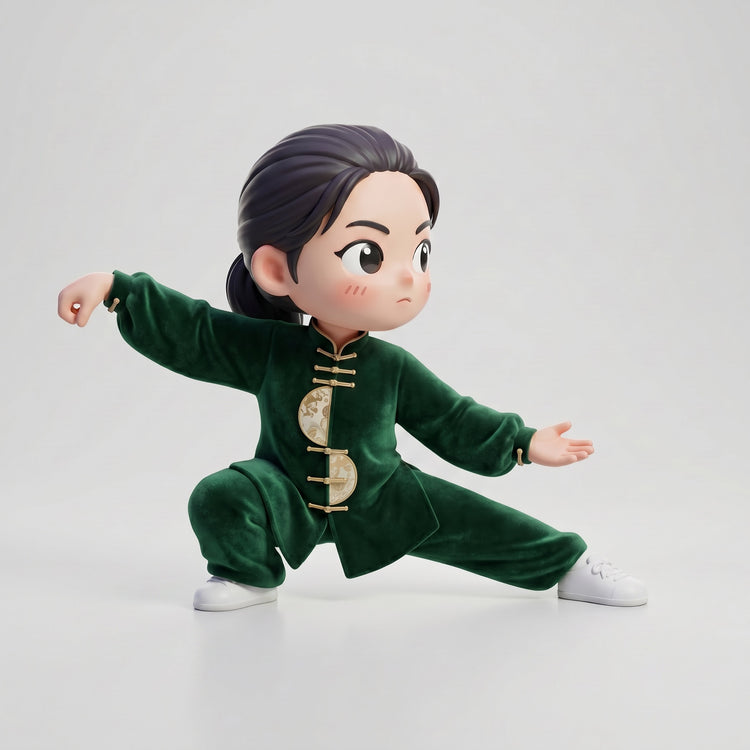
The AI-generated preview removes the second person and the room, leaving one complete figure on a light background. The supporting knee stays low, the opposite leg extends across the frame, and both hands remain separated. The dark green outfit, pale panels, gold-toned closures, tied-back hair, and white shoes are visible together.
MomentFig follows Preview Before Production. After suitable photos and complete order details are received, the design preview is provided within 12 hours. Useful checks for this case include the selected person, depth of the bent knee, length and angle of the extended leg, wrist direction, open palm, head turn, front-panel placement, and shoe positions. Physical production begins only after the preview is approved.
The finished figure kept the horizontal balance
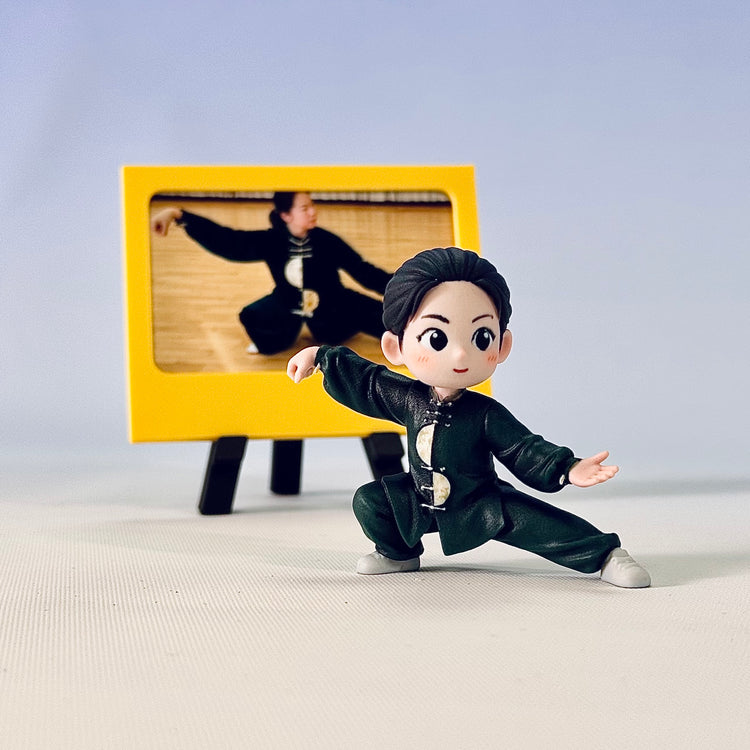
In the physical result, the bent leg supports the torso close to the floor while the other leg extends to a second white shoe. The bent-wrist hand and open opposite palm continue the same wide line as the legs. The yellow frame behind the figure shows the selected foreground pose without turning the background person into another figure.
After preview approval, production takes 4–6 calendar days. U.S. shipping takes an estimated 7–9 calendar days after dispatch, so the 4–6-day production window is not total delivery time. If an order arrives damaged during shipping, MomentFig provides a Full Refund for Shipping Damage once the damage is confirmed.
Browse more real custom figure examples, compare the complete sequence on How It Works, use the design preview review checklist, or begin with Product A: Custom Figure from Photo.